1.5 KiB
1.5 KiB
Debugging NRD
Currently NRD plugin supports debbugging through the validation layer.
VALIDATION LAYER
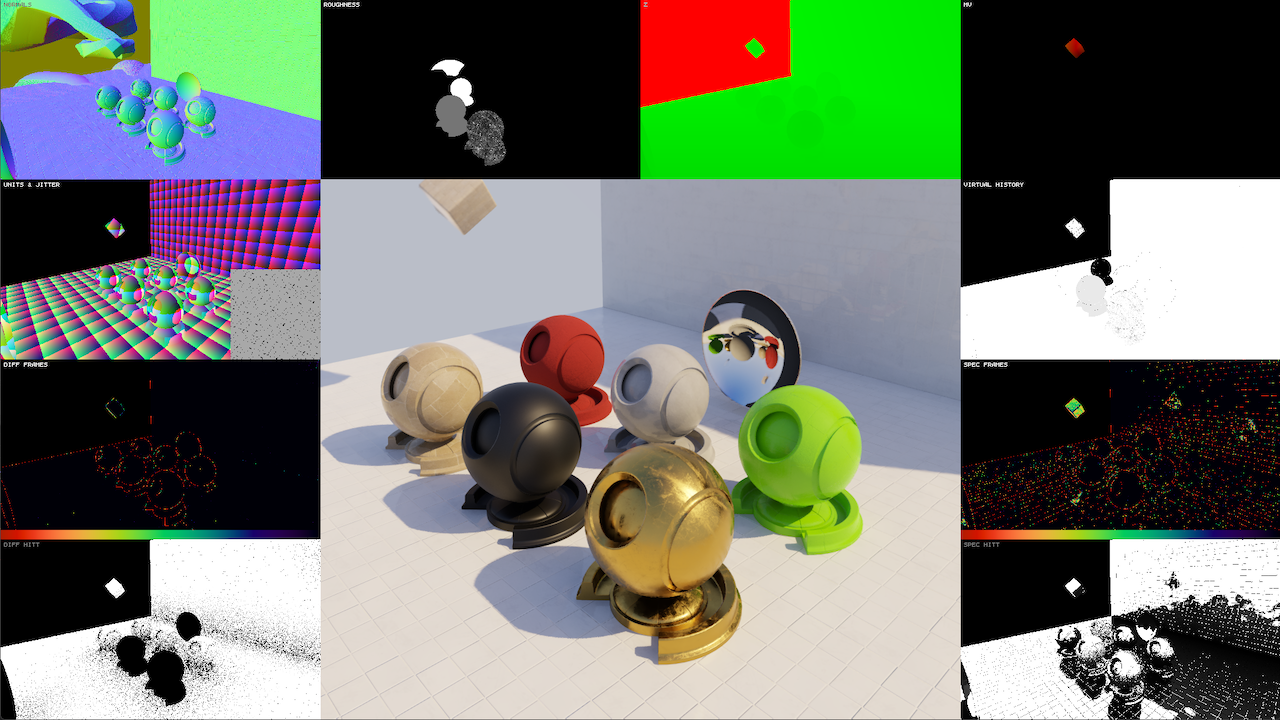
If NRDCommonSettings::enableValidation = true REBLUR & RELAX denoisers render debug information into OUT_VALIDATION output. Alpha channel contains layer transparency to allow easy mix with the final image on the application side. Currently the following viewport layout is used on the screen:
| 0 | 1 | 2 | 3 |
|---|---|---|---|
| 4 | 5 | 6 | 7 |
| 8 | 9 | 10 | 11 |
| 12 | 13 | 14 | 15 |
where:
- Viewport 0 - world-space normals
- Viewport 1 - linear roughness
- Viewport 2 - linear viewZ
- green =
+ - blue =
- - red =
out of denoising range
- green =
- Viewport 3 - difference between MVs, coming from
IN_MV, and expected MVs, assuming that the scene is static- blue =
out of screen - pixels with moving objects have non-0 values
- blue =
- Viewport 4 - world-space grid & camera jitter:
- 1 cube =
1 unit - the square in the bottom-right corner represents a pixel with accumulated samples
- the red boundary of the square marks jittering outside of the pixel area
- 1 cube =
REBLUR specific:
- Viewport 7 - amount of virtual history
- Viewport 8 - number of accumulated frames for diffuse signal (red =
history reset) - Viewport 11 - number of accumulated frames for specular signal (red =
history reset) - Viewport 12 - input normalized
hitTfor diffuse signal (ambient occlusion, AO) - Viewport 15 - input normalized
hitTfor specular signal (specular occlusion, SO)